A project can be easy to work on today and difficult to restart later. The missing piece is often a small decision: which blue you substituted, which hook you tested, or whether the marked repeat was the last one completed. A paper reference pack gives those decisions a home beside the work. The workflow below is a suggested way to organise a project, not a tested promise about speed or completion.
Start with a question the sheet can answer
Before printing, ask what you would need to know after a week away from this project. If the answer is only the next instruction, a short note may be enough. If the work has several materials, a chart, or a change from the original instructions, a project sheet gives those references one place. Print the planner first; add chart paper when the design actually needs it.
Use the same name on the sheet, chart, and material bag. A title such as Blue border bracelet B is more useful than New project when two colour tests are on the table. Put the pattern source and version in their own field so a working note does not accidentally look like an instruction from the designer.
Make a material row traceable
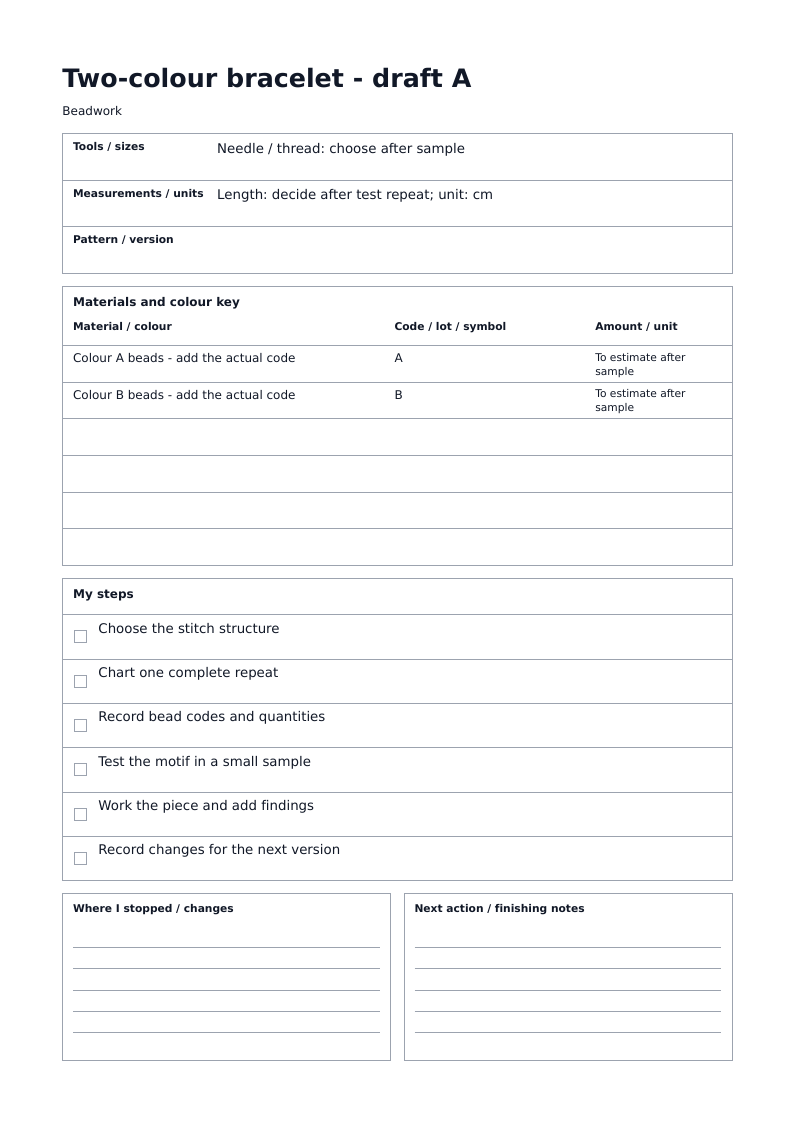
A material entry should identify the object you will pick up. Write a name in the first column, a manufacturer code or your chart symbol in the second, and an amount with a unit in the third. A symbol such as A only works if the same letter appears in the chart key. A colour name by itself may not distinguish two similar shades.
If you are still planning a purchase, label the amount as required or to buy. If you are recording supplies on hand, label it owned. Do not mix these meanings and then add them together. Paperka stores the text you enter; it does not infer quantities from a drawing, calculate consumption, or check your stock.
Choose a chart by what one mark represents
For a knitted motif, a cell can represent a stitch. Measure stitches and rows over the same distance on your sample and enter both into the knitting chart generator. Keep the measured gauge and tool size on the project sheet. The chart preserves a ratio at an enlarged drawing scale, so it is not a ruler for the finished piece.
For beadwork, one position can represent a bead. Choose loom, peyote, or brick stitch before drawing and write the technique beside the motif. Keep bead codes in the project sheet and chart symbols in the key. The square chart positions describe arrangement; an actual sample is still needed to judge the proportions and size with your beads.
Use a small test to resolve an actual decision
Write down the question before testing: is the border legible in these two colours, does the repeated motif meet cleanly, or do these materials make the required size? Record the result you will use, including a rejected choice if you might otherwise repeat it. There is no need to document every attempt.
For embroidery, the same record can hold fabric and thread codes, the intended design area, and a note about a test section. This planner does not supply an embroidery chart or turn a fabric count into finished dimensions. Keep any calculation and its units with the original pattern reference.
Replace the default list with real stopping points
The craft presets are a starting outline. Turn an entry such as Work the main pieces into a step you can visibly finish: left panel complete, centre motif checked, or fastening attached. Keep each line short enough to scan while working. If the project needs more than eight steps, group the plan into stages and use another sheet for the next stage.
At the end of a session, distinguish completed from next. Write a location in Where I stopped and an action in Next action. For example: chart B, repeat 4 complete; next, test the outside border. On return, this is more actionable than a date or a general note saying continue.
Keep the final decision after the last stitch
When you finish, correct the material codes and tool size to match what you actually used. Record a change you would repeat or avoid, and keep the final chart with the project sheet. If you later make a variant, give it a new version label so the old decisions remain understandable.
Download the PDF and keep a copy wherever you store project files. Edits in this planner are sent with the form rather than saved in its address, so a bookmark will not restore your personal entries. The editable example below has a prefilled link with sample text; it is a starting point, not a saved version of your work.
Example: a two-colour bead bracelet
This is a planning example, not a tested bracelet pattern. It uses a repeat note, two chart symbols, and steps that include making a sample before deciding the length. Open it, replace the placeholder material information with your own codes and quantities, then use bead pattern paper to draft the motif.
Open the page for the next decision
- Craft Project Planner: record the project, materials, and next action.
- Knitting Chart Paper Generator: draw a knitted motif using your measured gauge ratio.
- Bead Pattern Paper Generator: draft a bead layout in the selected stitch structure.