What does this Sudoku generator create?
It creates standard 9 × 9 Sudoku puzzles from a valid completed grid, removes clues, and checks the remaining puzzle with a solver. A puzzle is accepted only when exactly one complete solution remains.
Logic puzzles
Build a classroom-ready or screen-free Sudoku set. Every 9 × 9 puzzle is checked for exactly one solution, and its seed lets you reopen or share the identical worksheet.
Exact puzzle preview
Actual output
An unedited A4 Sudoku page as the generator produced it, with one puzzle per sheet and its clues fixed. The solution for this grid is printed on a separate page so it can be withheld until the puzzle is finished.
Open the complete example PDF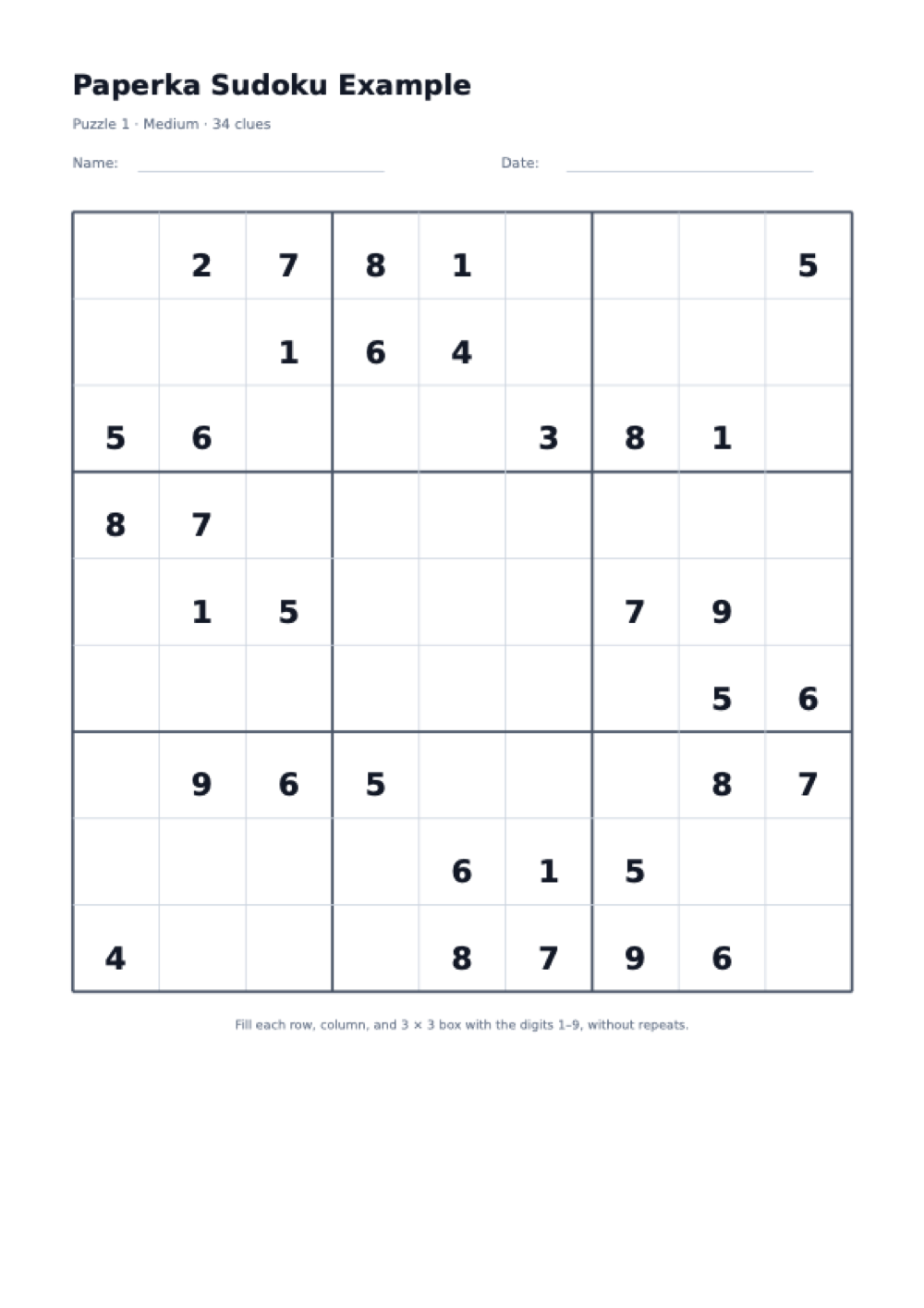
It creates standard 9 × 9 Sudoku puzzles from a valid completed grid, removes clues, and checks the remaining puzzle with a solver. A puzzle is accepted only when exactly one complete solution remains.
Use portrait orientation for the largest square grid, select Letter or A4, and print at actual size. Each puzzle gets its own page, while answer grids are grouped separately so they can be withheld from learners.
Use them for classroom early-finisher folders, logic warm-ups, homeschool breaks, adult activity packs, travel, senior recreation, screen-free quiet time, or a repeatable weekly puzzle routine.
Rules of the game
The goal is to complete the grid by logic, not arithmetic. The printed digits are fixed clues and must not be changed.
The board has 9 rows and 9 columns, divided into nine smaller 3 × 3 boxes. Some digits are already supplied as clues.
Fill the empty cells so every horizontal row contains the digits 1 through 9 exactly once, with no duplicate.
Every vertical column and every outlined 3 × 3 box must also contain 1 through 9 exactly once. A digit must satisfy all three areas at the same time.
You win when all 81 cells are filled and no row, column, or 3 × 3 box repeats a digit. Each generated puzzle has one verified solution.
A practical solving guide
Difficulty here changes the number of given clues, but every generated puzzle keeps one verified solution. A deliberate scan-and-candidate routine is more reliable than trying random digits.
Scan one unit at a time and list which digits from 1–9 are missing. Place a digit when only one cell can accept it, then rescan the crossing row and column.
For an empty cell, note only digits absent from its row, column, and 3 × 3 box. When one candidate remains, it is a naked single and can be written confidently.
A digit may appear in several candidate lists, yet have only one possible location inside a particular row, column, or box. That unique location is a hidden single.
Easy works for learning the rules or a short warm-up. Medium needs more candidate tracking. Hard starts with fewer clues and suits a longer independent session.
The seed identifies the exact set. Save the configured URL or write the seed on your lesson plan so you can replace a lost answer page or print the same challenge again.
If progress stops, inspect each row and column for a repeated digit before checking the answer page. A single early duplicate can make every later candidate look impossible.
A learner who knows only scanning will brute-force an easy grid and stall on a medium one. Naming the single technique a sheet is meant to practise, such as looking for the last empty cell in a box, turns a puzzle into a lesson.
FAQ
Yes. After each clue removal, the built-in solver counts solutions up to two. The removal is kept only when the count remains exactly one, so the finished puzzle is not ambiguous.
Easy keeps 40 clues, medium 34, and hard 28. Fewer clues generally require more candidate work, though the exact path through any Sudoku can vary with the clue positions.
The seed is a number used to build the completed grids and choose clue positions. The same seed, level, and puzzle count reproduce the same set, which is useful for reprints and shared assignments.
Yes. Turn on the answer key and the PDF places solution grids after all puzzle pages. You can print only the first pages for students or keep the final answer page for checking.
Choose one to four puzzles. Each puzzle receives a full page with optional name and date lines; up to four compact solutions fit on one answer page.
The generator is free, requires no account, and adds no watermark. The PDF uses fixed Letter or A4 dimensions and can be printed as often as needed for personal, family, or classroom use.
Related reading